

Publish Component
As described in the architecture overview, Keboola consists of many different components. Only those components that are published in our Component List are generally available in Keboola. The list can be found in our Storage Component API in the dedicated Components section. The list of components is managed using the Keboola Developer Portal.
That being said, any Keboola user can use any component, unless
- the Keboola user (or their token) has a limited access to the component.
- the component itself limits where it can run (in what projects and for which users).
If you have not yet created your component, please go through the tutorial, which will navigate you through creating an account in the Developer Portal and initializing the component.
Publishing Component
Section titled “Publishing Component”A non-published component can be used without limitations, but it is not offered in the Keboola UI. It can only be used via the API or by directly visiting a link with the specific component ID:
https://connection.keboola.com/admin/projects/{PROJECT_ID}/extractors/{COMPONENT_ID}This way you can fully test your component before requesting its publication. Also, unpublished components are not part of our list of public components. An existing configuration of a non-public component is accessible the same way as a configuration of any other component.
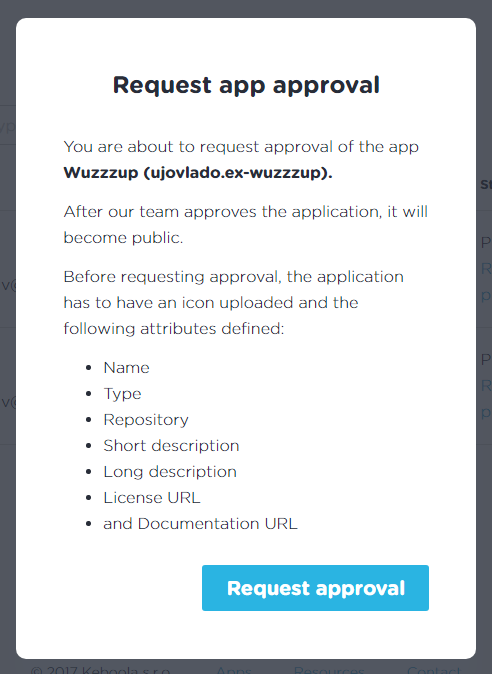
Before your component can be published, it must be approved by Keboola. Request the approval from the component list in the Developer Portal. We will review your component and either publish it or contact you with required changes.
Component Review
Section titled “Component Review”The goal of the component review is to maintain reasonable end-user experience and component reliability. Before applying for component registration, make sure the same component does not already exist. If there is a similar one (e.g., an extractor for the same service), clearly state the differences in the new component’s description. During our component review, the best practices in the next sections are followed.
Component Name and Description
Section titled “Component Name and Description”Before you name and describe your component, check out our YouTube, Facebook Pages, Dark Sky, and ECB Currency Rates components for inspiration.
- Names should not contain words like
extractor,application, andwriter.
OK: Cloudera Impala
WRONG: Cloudera Extractor - The short description describes the service (helping the user find it) rather than the component.
Obviously for large services like Facebook or Gmail, describe the part of the service relevant to the component.
OK: Native analytic database for Apache Hadoop
WRONG: This extractor extracts data from Cloudera Impala
OK: Facebook Pages connect your business with people. Facebook Insights help you get good at it.
WRONG: Facebook connects you with friends, family and other people you know, allows you to share photos and videos, send messages and get updates. - The long description provides additional information about the extracted/written data:
What will the end user get? What must the end user provide? Is the data going to be imported incrementally? Are there links to
available resources?
Configuration instructions should not be included in the long description, because the long description is displayed before the end user starts configuring the component. However, if there are any special requirements (external approval, specific account setting), they should be stated.
OK: This component allows you to extract currency exchange rates as published by the European Central Bank (ECB). The exchange rates are available from a base currency (USD, EUR) to 30 destination currencies (AUD, BGN, BRL, CAD, CNY, CZK, EUR, GBP, HKD, HRK, HUF, CHF, IDR, ILS, INR, JPY, KRW, MXN, MYR, NOK, NZD, PHP, PLN, RON, RUB, SEK, SGD, THB, TRY, ZAR). The rates are available for all working days from 4 January 1999 up to present. - Component icons must be of representative and reasonable quality. Make sure the icon license allows you to use it.
- Components must correctly state the data flow --- UI options. Use
appInfo.dataOutandappInfo.dataInfor this purpose:- Use
appInfo.dataInfor extractors, which bring data into a Keboola project (omitappInfo.dataOutfor extractors). - Use
appInfo.dataOutfor writers, which send data outside (omitappInfo.dataInfor writers). - Use
appInfo.dataInand/orappInfo.dataOutfor applications.
- Use
- Use
appInfo.betain UI options if you suspect changes to the component behavior. - Licensing information must be valid, and the vendor description must be current.
Component Icon
Section titled “Component Icon”- Use a PNG image that is at least 256x256px large and has transparent background.
Component Configuration
Section titled “Component Configuration”- Use only the necessary UI options (i.e., if there are no output files, do not use
genericDockerUI-fileOutput). - For extractors, always use the default bucket --- do not use the
genericDockerUI-tableOutputflag. - Use encryption to store sensitive values. No plain-text passwords!
- Use a configuration schema.
- List all properties in the
requiredfield. - Always use
propertyOrderto explicitly define the order of the fields in the form. - Use your short
titlewithout a colon, period, etc. - Use
descriptionto provide an explanatory sentence if needed.
OK: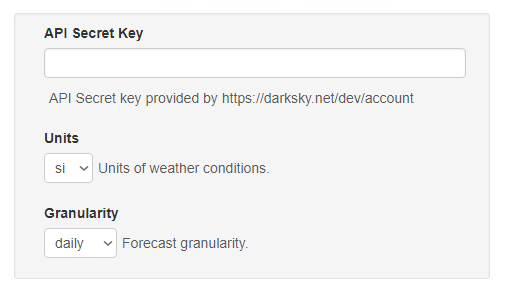
WRONG: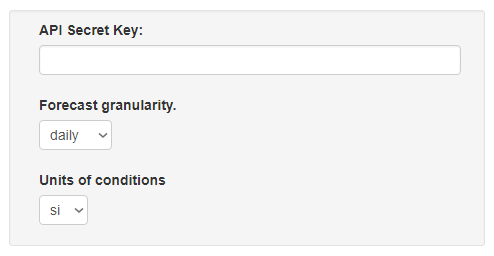
- List all properties in the
- Use a configuration description only if the configuration is not trivial/self-explanatory. Provide links to resources
(for instance, when creating an Elastic extractor, not everyone is familiar with the ElasticSearch query syntax). The
configuration description supports markdown. Your markdown should not start with a header and should use only level 3 and
level 4 headers (level 2 header is prepended before the configuration description).
OK:some introduction textWRONG:
### Input Description
description of input tables
#### First Table
some other text
## Configuration Description

some introduction text


#### Input Description

description of input tables
Component Internals
Section titled “Component Internals”- Make sure that the amount of consumed memory does not depend on the amount of processed data. Use streaming or processing in chunks to maintain a limited amount of consumed memory. If not possible, state the expected usage in the Component Limits.
- The component must distinguish between user and application errors.
- The component must validate its parameters; an invalid configuration must result in a user error. User error messages must clearly state what’s wrong and what the user should do to fix the issue. E.g.,
Invalid configuration.is wrong,Login failed, check your credentials.is better. - The events produced must be reasonable. Provide status messages if possible and with a reasonable frequency. Avoid internal messages with no meaning to the end user. Also avoid flooding the event log or sending data files in the event log.
- Set up continuous deployment so that you can keep the component up to date.
- Use semantic versioning to mark and deploy versions of your component. Using other tags (e.g.,
latest,master) in production is not allowed.
Checklist
Section titled “Checklist”Before requesting to publish a component, please check all rules using this checklist.